

A. Guild Matching Function Improvement
1. Guild Matching UI Function Improvement
1) Guild Matching - Guild Member Recruitment
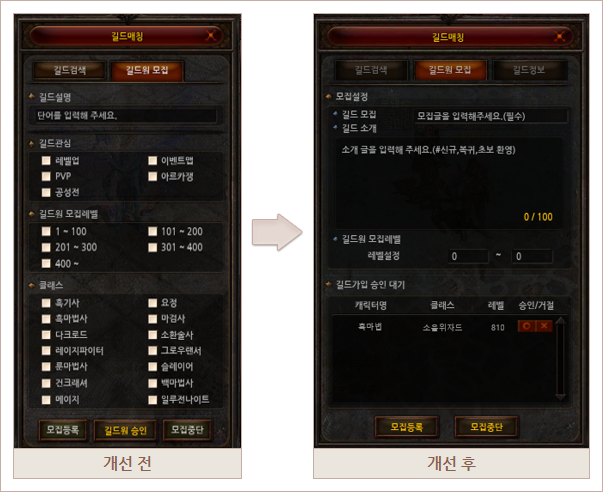
(1) The guild member recruitment screen has been improved.
(2) The guild member recruitment items have been renewed to allow for easier guild recruitment settings.
(3) When writing a guild recruitment post, you can ‘register recruitment’.
(4) A new Guild Introduction item has been added to replace the Guild Interest and Class items.
① You can enter text in the guild introduction section, with a maximum of 100 characters.
(5) The method for setting the guild member recruitment level has been changed from a checkbox format to a direct input format.
(6) When you click the recruitment registration button, you will be registered in the guild matching list, and the recruitment settings you have created
will be saved in the guild member recruitment tab.
will be saved in the guild member recruitment tab.
(7) A new guild membership approval waiting item has been added.
① You can approve/reject guild membership application by pressing the O/X button.
② When you click the guild membership notification icon, the guild member recruitment tab in the guild matching window appears.
③ The existing guild member approval button will be deleted.
④ The existing guild membership approval waiting window will be deleted.
2. Improved Guild Recruitment Tooltip Information
1) Guild Matching - Guild Search
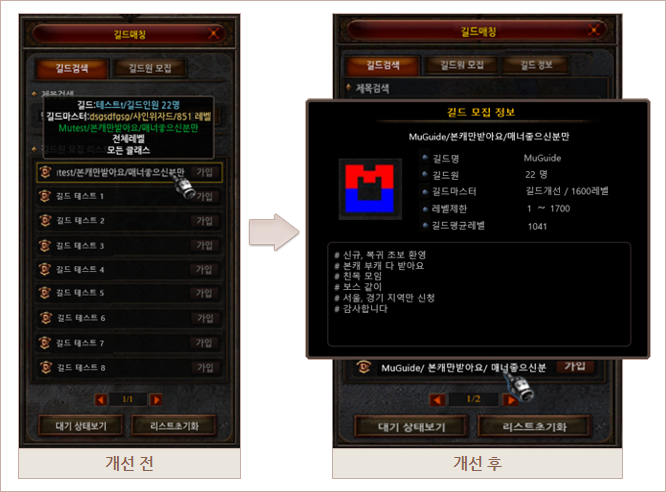
(1) The guild recruitment list tooltip information screen has been improved.
(2) You can check guild recruitment information by clicking on the guild list.
(3) A new guild recruitment information item has been added.
① Guild mark information has been added.
② Guild average level information has been added.
③ Guild introduction information has been added.
(4) When clicking the Join Guild button, a confirmation pop-up window asking for your intention to join has been added.
3. Guild information integration
1) Guild Matching – Guild Information
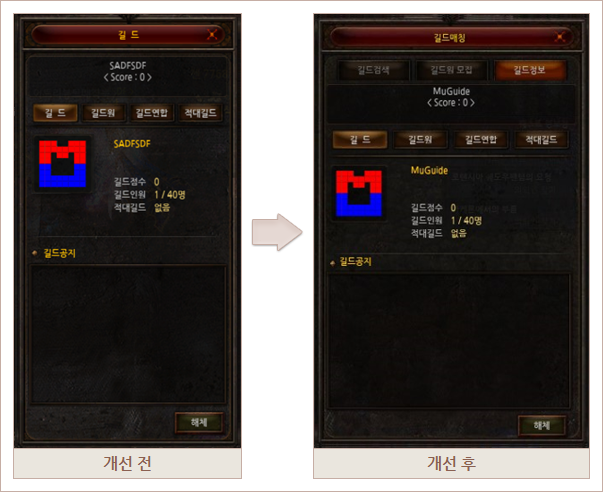
(1) A new Guild Information tab is added.
(2) You can check the information of the existing guild window in the guild information tab in the guild matching UI.
(3) The existing guild information window will be deleted.
(4) When a user who has joined a guild presses the shortcut key [G], the guild information tab on the guild matching screen appears.
B. Combination UI Improvement
1. Combination - Equipment Enhancement/Crafting Menu Improvement
1. Combination - Equipment Enhancement/Crafting Menu Improvement
- When you put main materials into the combination window when enhancing equipment, enhancing elite equipment, or crafting Mastery/Legendary, auxiliary materials are automatically registered.
(Lucky Charm, Attribute Lucky Charm, Chaos Combination Charm, Attribute Chaos Combination Charm, and Mastery Chaos Combination Charm are optionally registered)
1) Equipment Enhancement
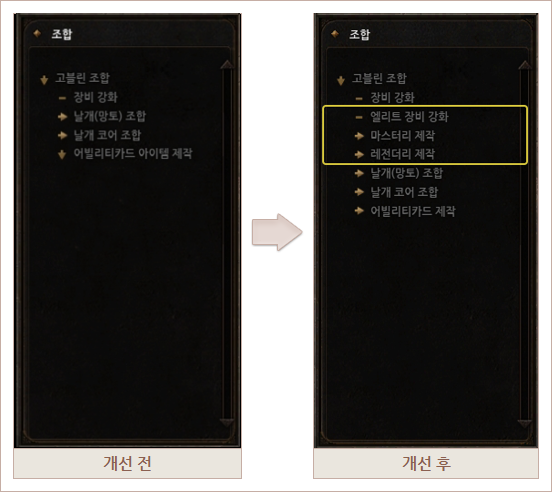
- You can strengthen weapons and armor, pentagrams, wings, wing cores, earrings, and artifacts, or
use the Temple Guard Reinforcement Stone auxiliary material when strengthening legendary equipment.
2) Elite Equipment Reinforcement
- You can strengthen legendary equipment by using the "Shining Temple Guard Reinforcement Stone" auxiliary material.
3) Mastery Crafting - You can craft Blood Angel Soul, craft and upgrade Mastery equipment, convert and combine, and craft
other material items . 4) Legendary Crafting - You can craft and upgrade legendary equipment, and convert and combine.
use the Temple Guard Reinforcement Stone auxiliary material when strengthening legendary equipment.
2) Elite Equipment Reinforcement
- You can strengthen legendary equipment by using the "Shining Temple Guard Reinforcement Stone" auxiliary material.
3) Mastery Crafting - You can craft Blood Angel Soul, craft and upgrade Mastery equipment, convert and combine, and craft
other material items . 4) Legendary Crafting - You can craft and upgrade legendary equipment, and convert and combine.