
A. New Combination Artifact Grade Upgrade
1. Definition of Artifact Grade
1) Artifact Grade
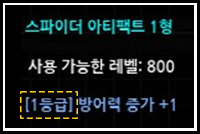
(1) This refers to the initial option value determined when creating an artifact.
(2) The grade is indicated in square brackets next to the artifact option.
(3) Artifact grades range from 1 to 10.
① Attack speed option grades range from 1 to 5.
2. Introduction to Grade Upgrade Combinations 1) Grade Upgrade Combination
(1) A grade upgrade combination is a combination that allows you to upgrade the grade of two artifacts with the same type, option, and grade value
① The attack speed option of Spider Artifact Type 4 cannot be upgraded.
(2) It can be accessed through the Chaos Goblin NPC in the Noria map.
(3) When the combination is successful, the grade of the artifact registered as the main material increases by +1.
① When an enhanced artifact is registered as the main material, combination is possible regardless of the enhancement level as long as the type, option, and grade value of the secondary material artifact are the same.
| Main ingredients | auxiliary materials | Success results |
| +9 Enhanced Artifact (Grade 1) | +1 Enhancement Artifact (Grade 1) | +9 Enhanced Artifact (Grade 2) |
(4) If the combination fails, the main material is maintained, and only the items registered as sub-materials are destroyed.
3. Period of use for grade upgrade combination
1) Limited to the artifact sales period
(1) Artifact grade upgrade combination is available only during the artifact combination event period.
2) Grade upgrade combination table
(1) When you right-click the main material artifact to be combined, the sub-material artifact and artifact enhancement stone are automatically registered.
① Sub-materials are automatically registered in the order of the inventory slots, and if there are two or more of the same artifact,
you can change the automatically registered artifact by changing the location of the artifact.
| Main ingredients | auxiliary materials | Essential Materials (1) | Essential Materials (2) | Combination probability | Combination results |
| +1 Grade Artifact | +1 Grade Artifact (same type, options, and grade as the main material) |
20 Artifact Reinforcement Stones | 10,000,000 Zen | 90% | +2 Grade Artifact |
| +2 Grade Artifact | +2 Grade Artifact (same type, options, and grade as main material) |
25 Artifact Reinforcement Stones | 10,000,000 Zen | 85% | +3 Grade Artifact |
| +3 Grade Artifact | +3 Grade Artifact (same type, options, and grade as main material) |
30 Artifact Reinforcement Stones | 10,000,000 Zen | 80% | +4 Grade Artifact |
| +4 Grade Artifact | +4 Grade Artifact (same type, options, and grade as main material) |
35 artifact enhancement stones | 10,000,000 Zen | 75% | +5 Grade Artifact |
| +5 Grade Artifact | +5 Grade Artifact (same type, options, and grade as the main material) |
40 artifact enhancement stones | 10,000,000 Zen | 70% | +6 Grade Artifact |
| +6 Grade Artifact | +6 Grade Artifact (same type, options, and grade as main material) |
45 artifact enhancement stones | 10,000,000 Zen | 65% | +7 Grade Artifact |
| +7 Grade Artifact | +7 Grade Artifact (same type, options, and grade as main material) |
50 Artifact Reinforcement Stones | 10,000,000 Zen | 60% | +8 Grade Artifact |
| +8 Grade Artifact | +8 Grade Artifact (same type, options, and grade as main material) |
55 artifact enhancement stones | 10,000,000 Zen | 40% | +9 Grade Artifact |
※ +9 grade artifacts cannot be upgraded to +10 grade artifacts. (Added on June 13, 2024)
4. Combination System UI Settings
1) Chaos Goblin Equipment Reinforcement/Crafting
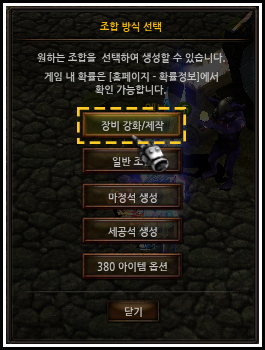
(1) When you click the [Equipment Reinforcement/Crafting] button in the 'Chaos Goblin' (108.102) of the Noria map, the Goblin Combination Window UI will be displayed.
2) Goblin Combination Window UI
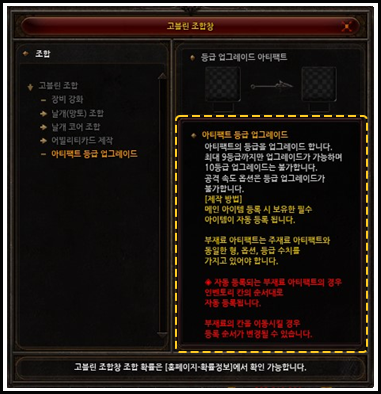
(1) When you click [Artifact Grade Upgrade] in the Goblin Combination Window UI, the combination description and guidance text page will be displayed.
3) Grade Upgrade Combination UI
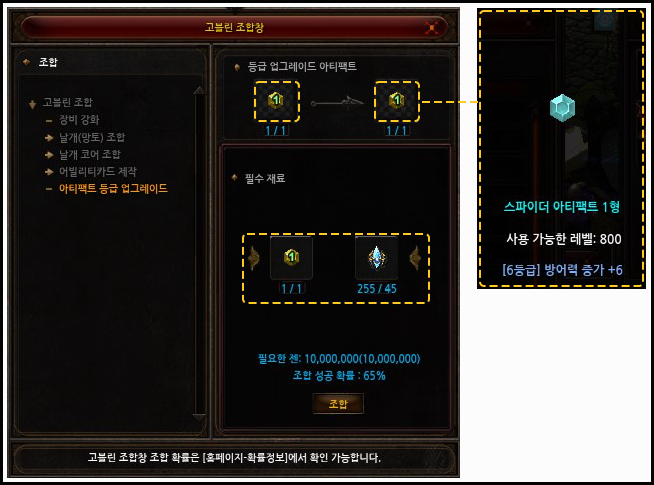
(1) When you register a main material artifact in the combination window, the required combination materials held in your inventory will be automatically registered.
(2) You can check the detailed information of the artifact you will obtain upon successful upgrade in the Expected Combination field.
B. Change artifact-related system settings
1. Barca compensation adjustment
1) The number and probability of ‘Artifact Reinforcement Stones’ among the Barca clear rewards will be adjusted.
(1) Changes
[existing]
| Barca 1-time play reward | |||
| Artifact Reinforcement Stone | 60% | 5 | |
| Artifact fragment | 40% | 1 piece | |
[change]
| Barca 1-time play reward | |||
| Artifact Reinforcement Stone | 20% | 4 pieces | |
| Artifact Reinforcement Stone | 40% | 2 pieces | |
| Artifact fragment | 40% | 1 piece | |
2. Adjust artifact-related probability
1) The probability of artifact creation combination is adjusted.
(1) Changes
| Artifact Combination | Existing probability | Change probability | |
| Artifact fragment | 80% | 70% | |
| 50 Jewels of Creation | |||
| 10 million Zen |
3. Added convenience to the artifact system
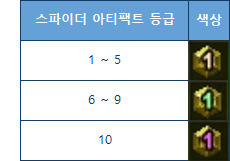
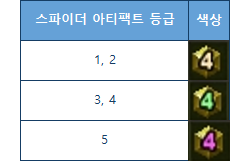
1) Add grade colors
(1) High-grade artifact colors have been added to your inventory.
(2) Colors by grade can be checked as follows.
<Artifacts of Grades 1 to 10>
<Artifacts of Grades 1 to 5>
- Only Type 4 artifacts with the 'Attack Speed' option are displayed as follows.
<Artifacts of Grades 1 to 5>
- Only Type 4 artifacts with the 'Attack Speed' option are displayed as follows.
2) Added UI for artifact possession status
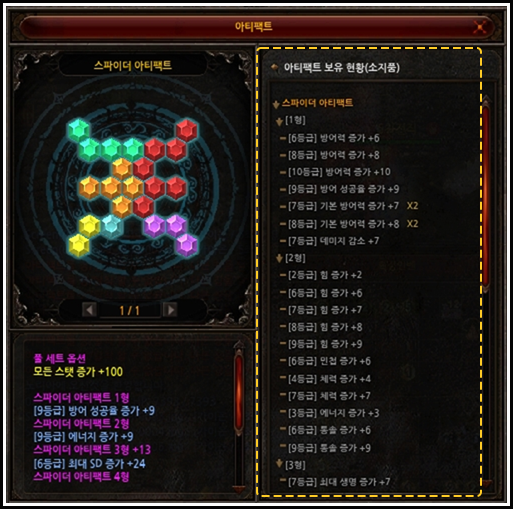
(1) A UI has been added that allows you to check the status of artifacts you have in your inventory.
(2) You can open the window through the expansion button in the artifact UI window.