

A. Party function enhancement
1. Party function enhancements
1) Party maintenance function
① Even if the party leader and all party members disconnect, the party will remain.
② Party leaders and party members can directly leave the party by using the party withdrawal function.
(However, if there is no login record for 30 days, the character will be automatically removed from the party.
If the party leader does not log in for 30 days, the party will be disbanded.)
2) Ability to maintain party status between channels
① Even if the party leader and party members are in different channels, party members can use each other's party content.
② Party members in the same channel and location share experience points and can use buff skills through the Mu Helper.
3) Added helper consignment and automatic movement functions to party members.
① When using the helper consignment and automatic movement functions to party members even if they are located in different channels
Channel transfer takes place, and you can then summon and move party members in the same way as before.
② You can use the helper consignment and auto-move functions for party members in Loren Valley or Crywolf.
(However, it cannot be used in event map squares, etc.)
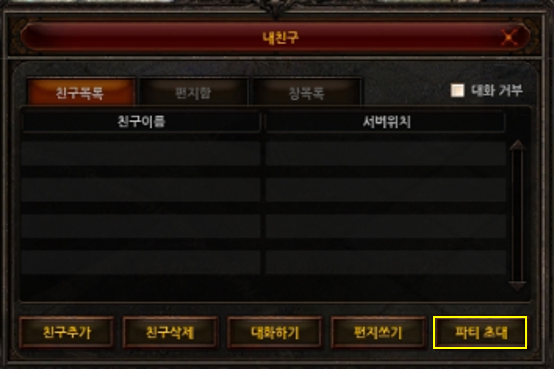
4) Friends Window - Party Invitation
① You can invite friends who are far away to a party using the My Friends UI.
(However, characters located in Loran Valley, Event Map Plaza, Loran Market, Dimension Labyrinth, etc. cannot be invited to a party.)
B. Party matching function improvement
1. Party matching UI function improvement
1) Party Matching - Recruiting Party Members

① You must write a recruitment notice to ‘register for recruitment.’
② When you click the recruitment registration button, you will be registered in the party matching list, and the last registered information will be saved.
③ When checking the required configuration of the energy fairy
- Set one of the party slots as a slot for the energy fairy.
Example) In a party of 4 attacking classes, classes other than the Energy Fairy cannot apply to join the party.
- Energy Fairy refers to a character whose energy stat is higher than their agility stat or whose energy stat is 1500 or higher.
④ Other password usage and automatic party approval functions are the same as before.
2) Party Matching – Party Search

① You can search the list of party recruitment registered in party matching.
② The information confirmation button is activated for parties that can join.
When you click on Check Information, you can check the composition information of the selected party.
③ When applying for membership after checking ‘Automatically execute helper consignment function when joining a party’
When joining a party, the helper assignment setting is automatically done.
If the party leader uses a delegated helper, channel movement, map movement, and helper execution will be applied.
④ Other random party and title search functions are the same as before.
C. Helper Plus
1. Add Helper Plus content
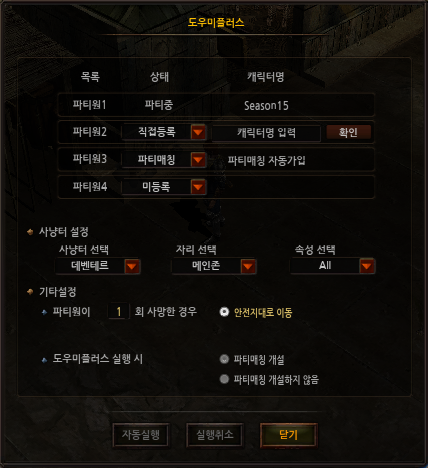
1) Run Helper Plus button
(1) Location of the Helper Plus button
① A crown-shaped ‘Helper Plus’ button has been added next to the Mu Helper button in the upper left corner.
② You can activate and pause the settings UI using the ‘Helper Plus’ button.
2) Helper Plus execution environment
(1) Conditions for activating the Helper Plus button
① Helper Plus can be run when you are not a party member or are the party leader.
(However, it cannot be used when you are a party member, and even if you are not a party member or the party leader
Helper Plus cannot be run in 'Loran Valley, Loran Market, Event Map Plaza, and Dimension Labyrinth'.)
2. Introduction to each Helper Plus feature
1) Helper Plus Party Recruitment
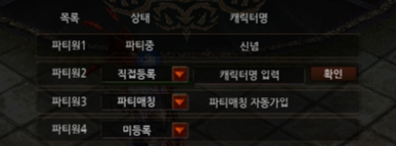
(1) Existing party members
① When you run Helper Plus, party members who are already in a party are automatically registered as ‘in party’.
② You can recruit party members through the remaining party member recruitment slots.
a) Party member recruitment function
(a) Direct registration
- Enter the character name and click the confirmation button to check if you are eligible to receive a party invitation.
You can register.
- When auto-running, a party invitation is sent to the registered character.
- Slots that you register directly are slots that can also be used to join a party through party matching.
(n) Party matching
- You can recruit party members using the saved party member recruitment settings.
- Party matching when auto-running - Party member recruitment is registered with the saved information.
The password settings specified at this time will not be applied and will be registered as public settings.
(D) Unregistered
- Unregistered is a setting that does not recruit party members.
- Even if you register for party matching, unregistered party member slots will be set as slots that characters cannot join.
※When not registered in a party or in a one-person party, all slots for party members 1 to 4 are not registered.
You can play solo .
2) Helper Plus hunting grounds and other settings
(1) Search and move to hunting grounds
① You can select the hunting location and monster attributes of hunting grounds with difficulty level higher than Deventer Hunting Grounds.
② When Helper Plus is automatically executed, it searches for the hunting ground set in the current channel first.
If there is no hunting area available, search for hunting grounds on other channels.
③ When moving to a designated hunting ground, if there are party members, the party leader will use the helper consignment function to move with the party members.
(Conversely, if a party member does not request help, they will not move together.)
④ If there are no hunting grounds available for hunting in any channel, Helper Plus will automatically terminate.
[Movement Settings]
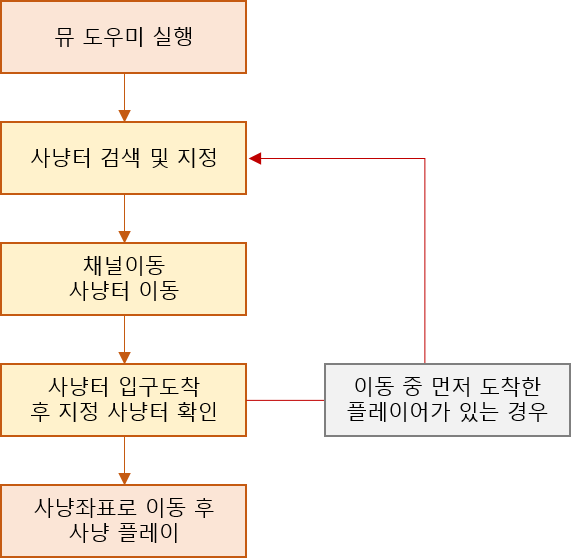
- The hunting grounds assigned to each player through the Mu Helper do not overlap.
- However, if there is a character who has arrived at the hunting ground through direct movement, a re-search of the set hunting ground will be conducted at the hunting ground entrance.
(2) Other settings
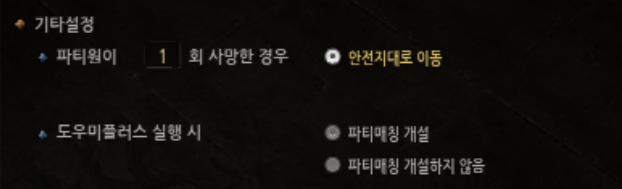
a) Action settings when a party member dies
(a) You can check the number of times a party member, including a solo play character or party leader, dies and wait in a safe zone.
(n) Even if the character dies before reaching the set number of deaths, the hunting grounds will be re-searched and hunting play will resume.
※ When checking the number of deaths of a character during party play, only the number of deaths of characters around the party leader is saved.
B) Party matching opened/unopened when running Helper Plus
(a) When running Helper Plus, you can automatically open a party matching service.
(n) However, you cannot recruit party members equal to the number of unregistered slots, and party matching can be opened with the password setting removed.
3. Auto-run function
1) Autorun and immediate run
(1) Function of the auto-run button
① If there are party members to recruit, the party member recruitment waiting status will be applied when the auto-run button is clicked.
② When all party members are registered in the party member recruitment slot, the set hunting ground will be searched and moved to, and hunting play will begin automatically.
(2) Run immediately button
① When you click the auto-run button, you will be put into a party member recruitment waiting state, and the auto-run button will change to an immediate run button.
② Clicking the Run Now button will end the waiting state and start hunting play immediately.
③ If the party matching settings are registered, party members can join and participate in hunting play.
※ When using Helper Plus, only the pause and minimap functions can be used.