

A. Personal store renewal
1. Personal store renewal details
1) Personal store buyers can search and purchase personal stores opened on the server from all channels and hunting grounds.
2) Personal stores will be changed from inventory format to list format.
3) An item list is added that only displays items registered for sale in the personal store.
4) A system that allows items to be sold in bundles has been added.
5) Items and goods obtained through personal shop sales/purchases can be received in the Gremory Case.
2. Personal stores have been changed to a list format for easier use.
Improved ability to sell/buy items.
1) Personal store list and item list

(1) You can check your personal stores in the Personal Store List tab as before.
(2) The newly added Item List tab allows you to search for items in all personal shops and purchase them immediately.
(3) Right-clicking on an item in the item list will allow you to whisper/send a letter to the seller selling that item.
(4) You can sort and view by clicking on the store name, character name, item name, category, quantity, and price tabs.
(5) Personal store buyers can search and purchase from personal stores in all channels and all hunting grounds.
(6) Personal shop sellers can open shops in the Loran Market, Lorancia, Elveland, Noria, and Devias Safe Zones.
(7) If a personal store seller moves to an area where personal stores cannot be opened after opening a personal store, the store will automatically close.
2) Sales outlets

(1) The existing inventory format sales store has been changed to a list format.
(2) You can register a sale item by clicking on the blank space in the sales store.
(3) Up to 20 lists can be registered in the sales store.
3. Changed the registration settings for sale items and added bundled sales.

1) Clicking on a blank space in the sales store will open a window where you can register items for sale.
2) You can register items by dragging and dropping them into the slot or right-clicking the mouse.
3) After registering an item and setting the price, click Confirm. The item will disappear from your inventory and be registered in the sales store.
4) To edit the price of an item registered in a store, click on the item while it is closed.
5) You can cancel the sale of an item registered in a store by clicking on the item in the closed store status and then clicking the Cancel button.
(1) Withdrawn items will be paid to the Gremory Case – Personal Shop tab.
6) For bundle sales, you can register a minimum of 2 and a maximum of 5 items.
(1) Bundle selling is a new sales method that sells items registered as a bundle at once.
(2) If you register 5 Blood Angel sets as a bundle sale for 100 axes, you can sell/purchase 5 Blood Angel sets at once.
4. Gremory Case – Personal Shop tab added.

1) The money earned from selling personal shop items and purchased items will be paid to the Gremory Case – Personal Shop tab.
2) Items that have been withdrawn from sale in the personal shop will be distributed to the Gremory Case – Personal Shop tab.
3) Gremory Case - Personal Shop Tab Settings
(1) The maximum number of possessions is 150.
(2) If the maximum number of items held is exceeded, selling/purchasing personal store items is not possible.
(3) The deadline for receiving the transaction amount and purchased items is 7 days, and the items will be deleted after the deadline.
(4) After completing a personal store transaction, there is a delay of approximately 1 minute before the transaction amount and purchased items are paid.
5. Other improvements to personal stores
1) Keyword search function has been added.
(1) In addition to the existing auto-complete search method, a function to search by entering only keywords has been added.
(2) Searching for “blood” will display a list of all items containing “blood”.
(3) However, word searches are only possible for two or more letters.
① Single-letter items can be searched using the existing auto-complete search function.
2) Item search function has been improved.
(1) If you search for fairy and magician items using the auto-complete function, you will find agility fairy/energy fairy,
You can search by distinguishing between wizard-type magician and knight-type magician items.
(2) Seed Sphere item search has been improved to allow for search by stage.
3) Changes to personal store items and improvements to settings
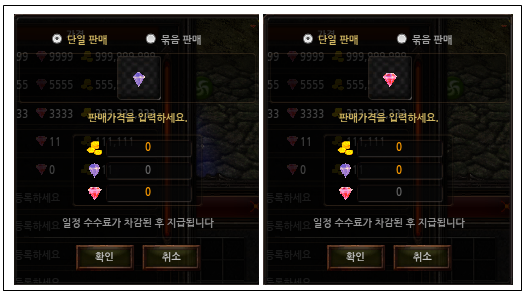
(1) When registering to sell jewelry items, you cannot set the same jewelry as the selling price.
① When selling a Blessing Jewel, the Blessing Jewel will be deactivated from the selling price.
(2) Chaos Jewel items can no longer be used for selling/purchasing in personal stores.
6. Closure of existing individual stores
1) The existing personal store will be closed due to personal store renewal.
2) All items in the existing personal shop will be automatically moved to the Gremory Case – Personal Shop.