
A. Live Improvement Update Story
1. Improved character selection screen
1) You can change the order by clicking the arrow to the right of the character slots on the character selection screen.

(1) Character slot positions can be moved freely, but cannot move beyond empty character slots.
2. Improved in-game visibility
1) The color of the party character and party member health bars has been changed to be distinguishable from the color of the monster health bars.

(1) The character's health bar color changes to green.
2) The repair, divide, and disassemble icons will change.
(1) Changed the icon to more clearly indicate the cursor position.

3) The channel free movement text color is improved to a brighter color.
3. Improved Lucky Item System
1) The Lucky Item wearing and refining system will be changed.
| existing | change | |
| Lucky Item Refining | Right click the mouse | Inventory disassembly button |
| Equip lucky items | Drag and drop | Drag and drop right click |
2) The extension jewel overlapping function is added.
(1) You can stack up to [10] extension jewels.
4. Improved MuDoumi system
1) When returning to the original position while using the Mu Helper, the issue where the character does not return to the original position after moving 1 tile has been improved.
(1) If another character is standing at the point where my character started the Mu Helper, it will return 1 tile away from that location.
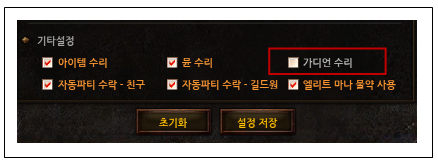
2) Guardian auto-repair function is added.
(1) You can automatically repair the guardian through the Mu Helper settings.
(2) Guardians are repaired using the Jewel of Blessing, and are repaired when the Guardian has 1 life remaining.
(3) You can use the Guardian Repair function in the bottom menu of [Other Settings] in Mu Helper.