

A. Play Improvement
1. Character max level expansion & season rewards
1) Increase character maximum level
(1) The character's maximum level has been changed from 1200 to 1250.
2) Season level rewards
(1) You can obtain a reward box by reaching Lv. 1200 before the next season.
(2) The reward box will be delivered in a Gremory case and the receipt period is 30 days.
(3) The reward box found in the Gremory Case has a validity period of 14 days.
(4) If you throw the reward box on the floor, you can obtain [Demon Swordsman Gaion Karen].
| Mune image | name | Basic abilities | Additional abilities |
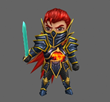 |
Magic Swordsman Gaion Carain |
+10 attribute defense when wearing a mune | Increases basic abilities by 20x for 30 days after acquiring the item. |
① Reward boxes that have been deleted due to the expiration of the receipt period cannot be recovered.
② Reward boxes that have expired and cannot be used cannot be recovered.
B. Simple UI
1. Description
1) This is a UI that allows you to edit the UI and configure frequently used menu buttons as a quick menu.
2. UI transition

1) You can switch between Classic UI <-> Simple UI using the ‘Switch UI’ button on the top right.
3. Run the menu button

1) You can run the connected UI and functions by clicking the menu button in the bottom quick menu.
2) You can check and run the full menu by clicking the full menu button ( ①) next to the quick menu at the bottom .
4. Edit
1) Edit quick menu

(1) When you open the full menu, you can edit the menu.
- A scissors icon will appear on the menu button in the quick menu.
(2) Click the menu button in the quick menu ( ①) , then click the menu button you want to change among the entire menu ( ② ) .
(3) The menu button selected from the full menu is registered in the quick menu location initially selected.
(4) Editing ends when you close the full menu window.
2) Change the location of the quick menu

(1) Execute the entire menu to enable menu editing.
(2) Click the menu button of the quick menu you want to change ( ①) , then click another menu button ( ② ) whose location you want to change .
(3) The positions of the two menu buttons in the quick menu will change.
(4) Closing the full menu window exits the edit mode.